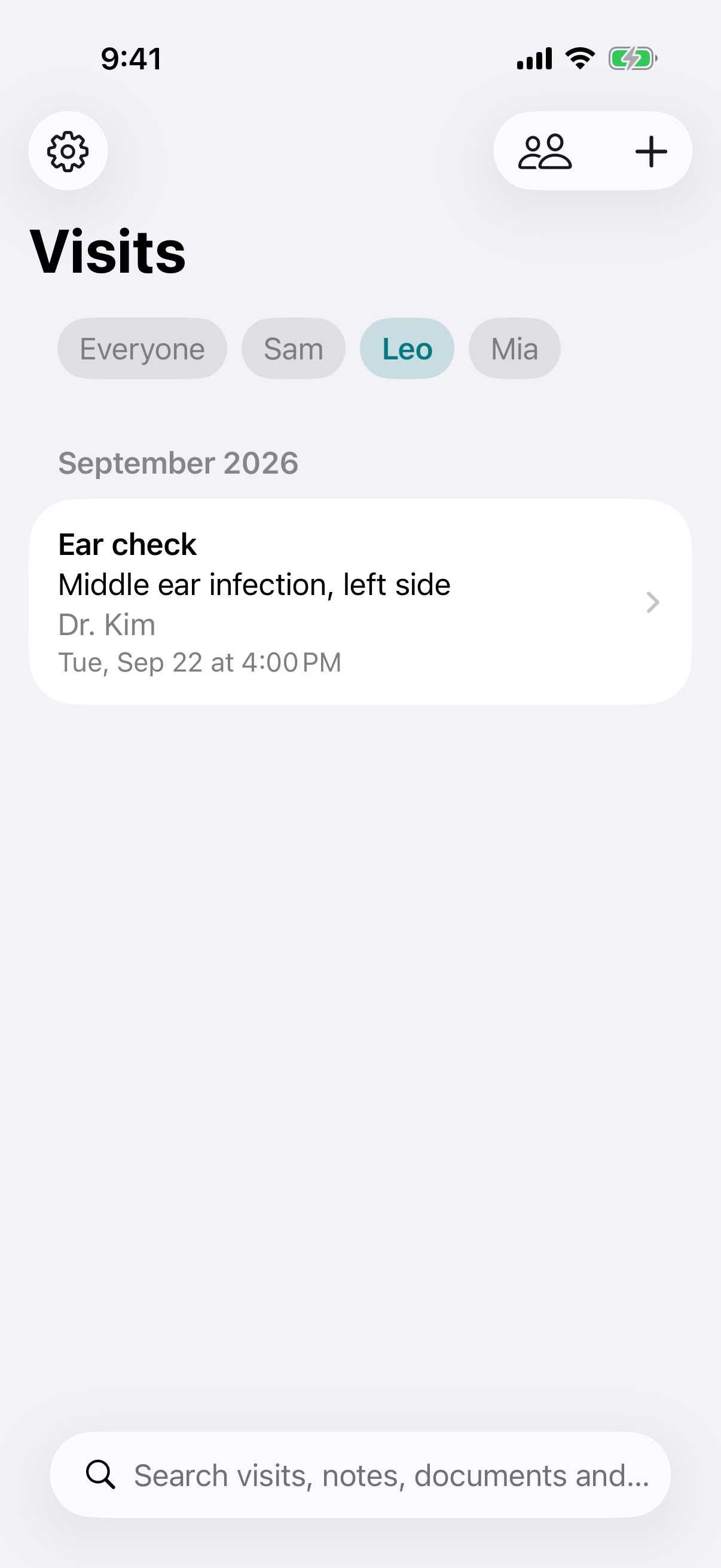
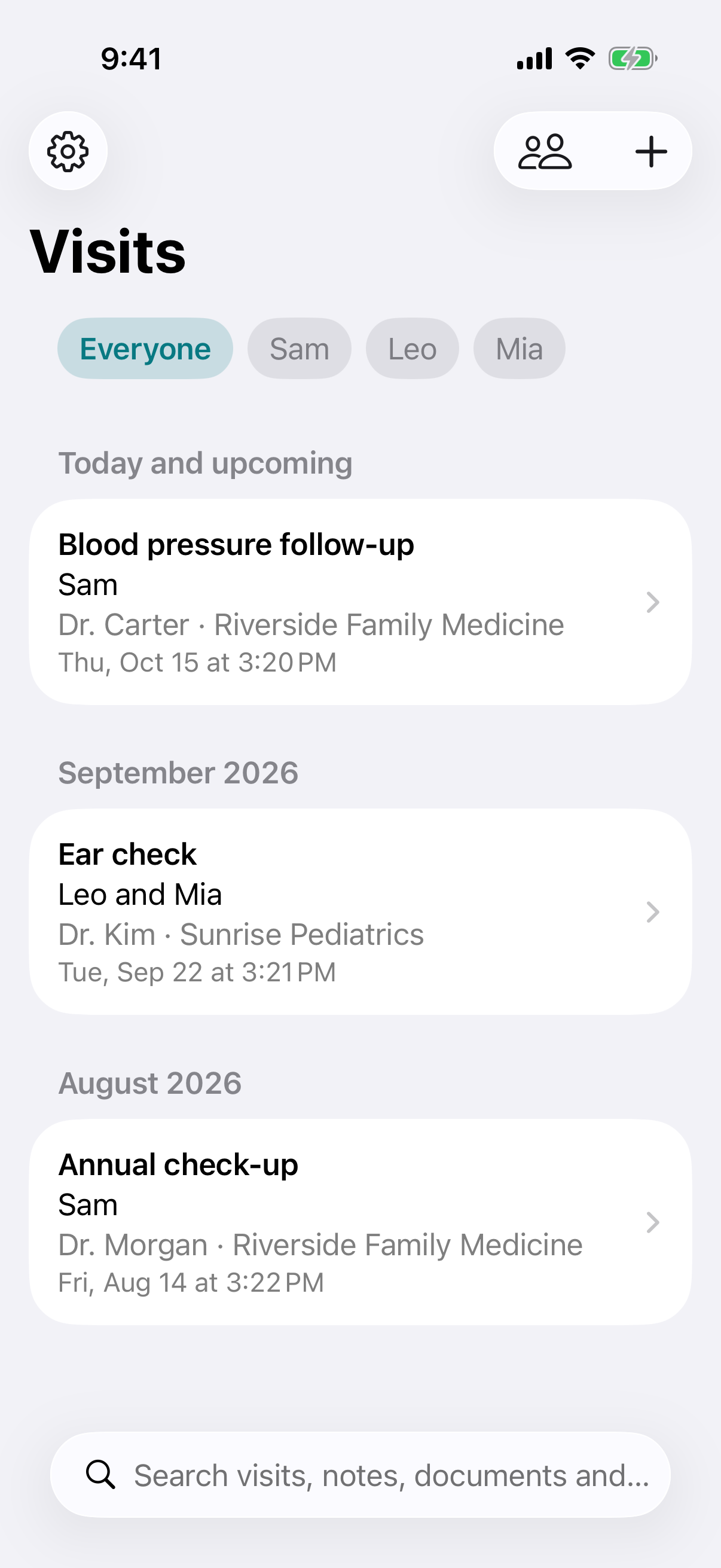
You or your whole family
Add yourself, your children or a parent. Several people can share one visit, each keeps their own diagnosis and documents, and each has their own timeline.
Private doctor visit log for iPhone
WellHeard keeps every appointment in one place, for you or for everyone in your family: the questions, a recording of the conversation, a written transcript that shows who said what, a translation, and each person's diagnosis. It all stays on your iPhone.
A doctor's visit packs a diagnosis, test results, medication changes and next steps into a few minutes, often when you are worried or tired, and sometimes in a language that is not your first. It is easy to walk out and realise you cannot repeat what was said.
WellHeard gives you a record you can go back to: what you wanted to ask, the original audio, a transcript you can read at your own pace, the papers you were handed, and what happens next. Over time it becomes the history of your care, kept by you.
Features
Add yourself, your children or a parent. Several people can share one visit, each keeps their own diagnosis and documents, and each has their own timeline.
Tap Record this visit and put the phone down. Recording continues with the phone locked, and starts only after you confirm everyone in the room agreed.
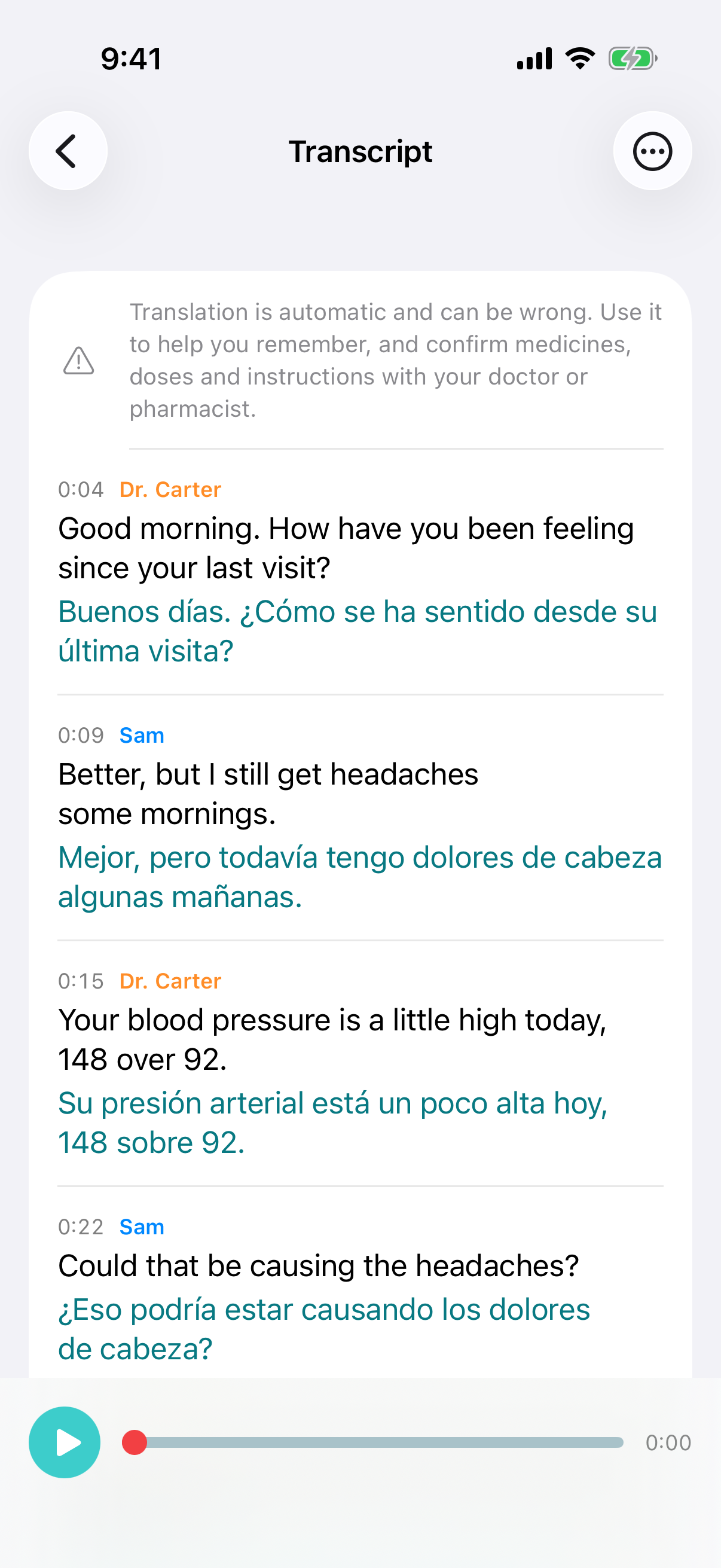
Turn the recording into text on your iPhone, each line labelled with who said it: name your doctor's voice once and their other lines are labelled for you. Tap a line to hear it again, so a dose is never a guess.
Read the visit in another language, line by line under what was said, for patients and caregivers who are more comfortable in a different language than the doctor's.
Write down what you want to ask before you go and tick each question off. Add follow-ups such as a blood test and get a reminder on your iPhone when it is due.
Attach a photo of a prescription, scan a lab report, or add a file or link. Text in photos and scans is read on the device, so you can search for it later.
Keep each bill with the visit it came from: what you owe, when it is due and a photo, with a reminder. Keep a photo of each insurance card to show at the front desk.
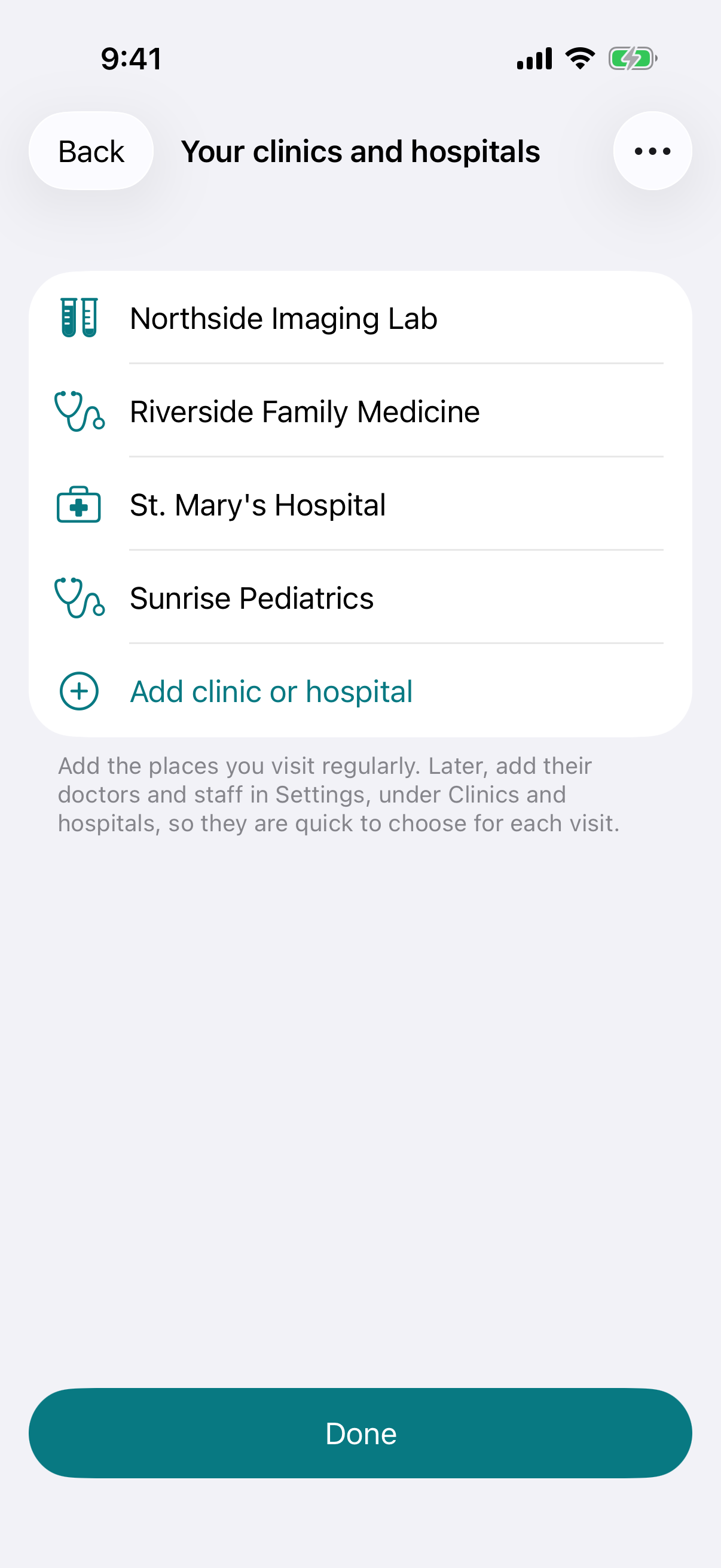
Add the clinics and hospitals you go to when you first open the app, then their doctors and staff. Pick the clinic and its team is ready to choose for the visit.
Find a visit by its reason, clinic, doctor or bill, or a phrase from a note, a transcript, a translation or a scanned document. Share any visit as a PDF.
How it works
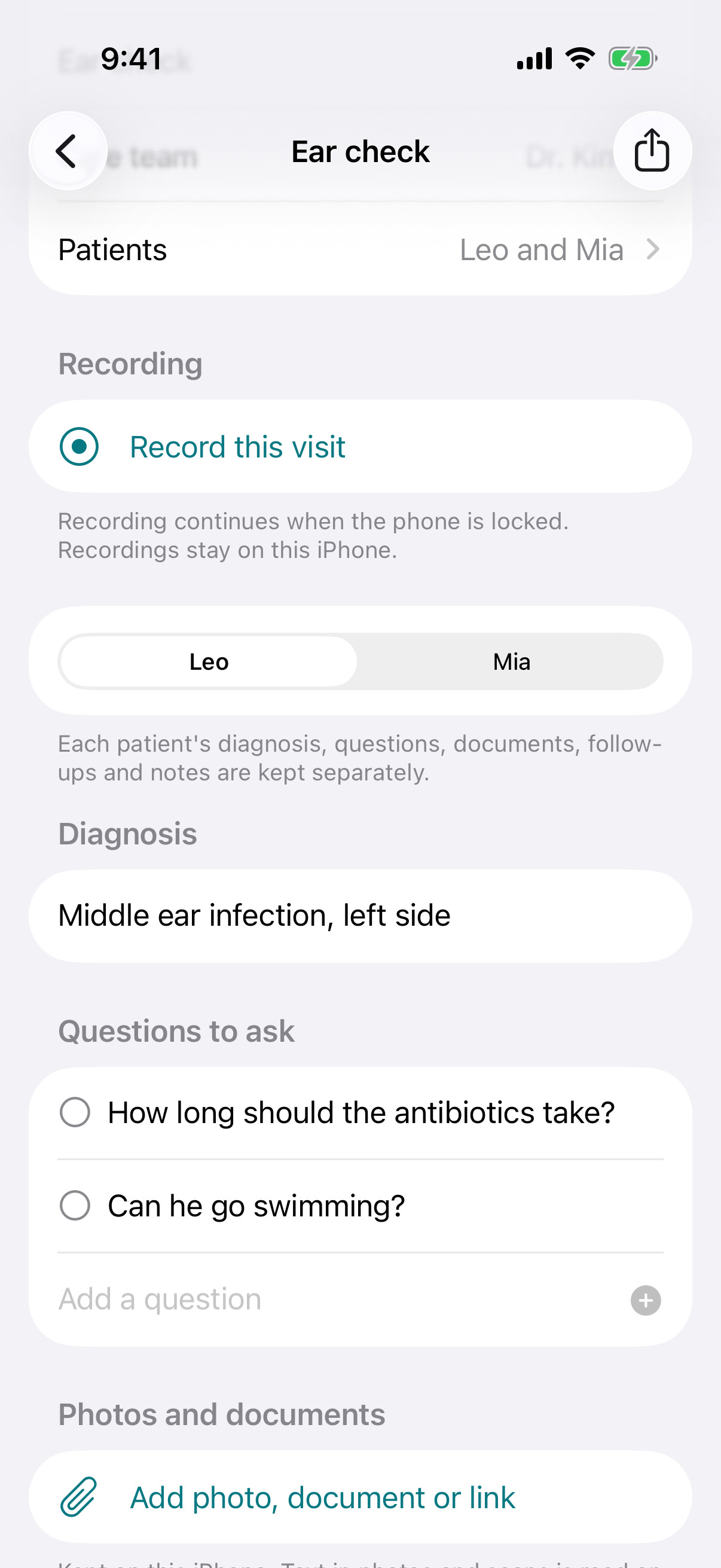
Tap Add visit, enter the reason and the doctor, tick who is being seen (you, a child, a parent), and write down the questions you want answered.
Tell your doctor you would like to record so you can remember their instructions. Tap Record this visit, confirm everyone agreed, and put the phone down.
Open the Transcript, say who is speaking on a line or two, translate it if you need to, and replay anything unclear. Note each person's diagnosis, add the papers you were given, and set reminders for what comes next.
Your clinics
When you first open WellHeard, add the clinics, hospitals and labs you visit. Each new visit then starts with the place and its people a tap away.
Who it's for
Keep diagnoses, medication changes and follow-up plans from every appointment in one history instead of relying on memory.
Keep each child's or parent's visits apart, take two kids to one appointment, and share a visit as a PDF with the rest of the family.
When the appointment is in one language and home is in another, a line-by-line translation helps nothing get lost.
For families
Use WellHeard just for yourself, or add the people you look after. Each person's records stay separate, even when they share an appointment.
Privacy
A conversation with your doctor is among the most personal things you can record. WellHeard is built so that we never see it.
Pricing
Your first visit is free, with every feature included. After that, a yearly subscription unlocks unlimited visits for you and your family.
Guides
Interpreters, preparation, and using a translated transcript so nothing important gets lost.
How to ask permission, where to put your phone, and what to do with the recording afterwards.
It depends on where you live. Some countries and US states let you record a conversation you are part of; others require everyone in the room to agree first. The simplest rule works everywhere: ask your doctor before you start. Most clinicians say yes when they know the recording is to help you remember their instructions. WellHeard asks you to confirm that everyone agreed before each recording starts.
No. WellHeard has no account, no server and no analytics. Your visits, notes, recordings, transcripts, translations, photos and documents are stored on your iPhone. Transcription, translation and reading the text in photos all happen on the device using Apple's built-in features. Information leaves your phone only when you export or share it yourself.
Your first visit is free, with every feature included. After that, a subscription of $9.99 a year unlocks unlimited visits for you and your family. It renews each year until you cancel it in your Apple Account settings, and the visits you have already saved stay available whether or not you subscribe.
Yes. Use it just for yourself, or add family members such as your children or a parent. Each visit lists who was seen; if two children see the doctor together, add both to one visit. The recording is shared, and each child keeps their own diagnosis, questions, documents and follow-ups. You can view everyone's visits or one person's history.
Yes. Add photos of the front and back of each family member's insurance card, with the insurer and member ID, to show at the front desk. For bills, add each one to the visit and patient it belongs to, with the amount, due date and a photo; WellHeard reminds you on the due date and shows the total still to pay. All of it stays on your iPhone.
Yes. Logging visits, recording, playback, search and reminders all work offline. Transcription and translation also run on the device, but the first time you use a language your iPhone downloads it once from Apple, which needs a connection.
WellHeard offers the languages that Apple's on-device speech recognition and translation support on your iPhone. The lists are shown in the app and depend on your iOS version. Not every pair of languages can be translated into each other; the app tells you when a pair is not available.
WellHeard requires an iPhone running iOS 26 or later. Transcription depends on Apple's on-device speech models, so it is available on the iPhone models Apple supports for that feature.
There is no time limit in the app. A saved recording takes about 15 MB per hour, so a 20-minute appointment is roughly 5 MB. Recording continues while your phone is locked. If you are short on space, a setting can delete the audio once it has been transcribed and keep only the text.
Automatic transcription and translation make mistakes, especially with medicine names, numbers, accents and background noise. That is why every line of the transcript is linked to the audio: tap a line to hear exactly what was said, with the original always shown beside the translation. Confirm medicines, doses and instructions with your doctor or pharmacist.
Yes. Turn on "Require Face ID or passcode" in the app's settings and WellHeard locks each time you leave it. Face ID is handled by iOS; the app never sees your face data.
Your visits are included in your iPhone's own backup, such as iCloud Backup, if you have it turned on. You can also export a single visit as a PDF to share with family or another doctor, or export everything, including recordings, photos and documents, as one file to keep as your own backup.
WellHeard is a personal record-keeping tool, not a medical device, and it does not give medical advice. HIPAA applies to healthcare providers, insurers and their business partners, not to records you keep for yourself. Because your information never reaches us, we do not hold any of your health information.
Delete a recording, an attachment or a whole visit inside the app at any time; deleting a visit removes its notes, questions, follow-ups, recordings, photos and documents. Deleting the app from your iPhone removes everything it stored.